Manage Every Agency from One Connected Platform.
Built for insurance groups, agency networks, franchises, and organizations that manage multiple independent agencies.
Give every agency the independence it needs to operate while giving leadership the visibility, reporting, user management, and AI-powered insights required to manage the entire organization.

Beyond a Single Agency
Taino Enterprise is designed for organizations that need more than office-level management. It connects multiple independent agencies under one organizational layer.
Agency Networks
Connect and oversee multiple agencies across one growing network.
Insurance Groups
Manage separate agencies owned or supervised by one parent organization.
Franchise Organizations
Support independently operated agencies while maintaining organization-wide standards.
Multi-Agency Owners
Move beyond separate systems and manage every agency from one place.
One Organization. Multiple Independent Agencies.
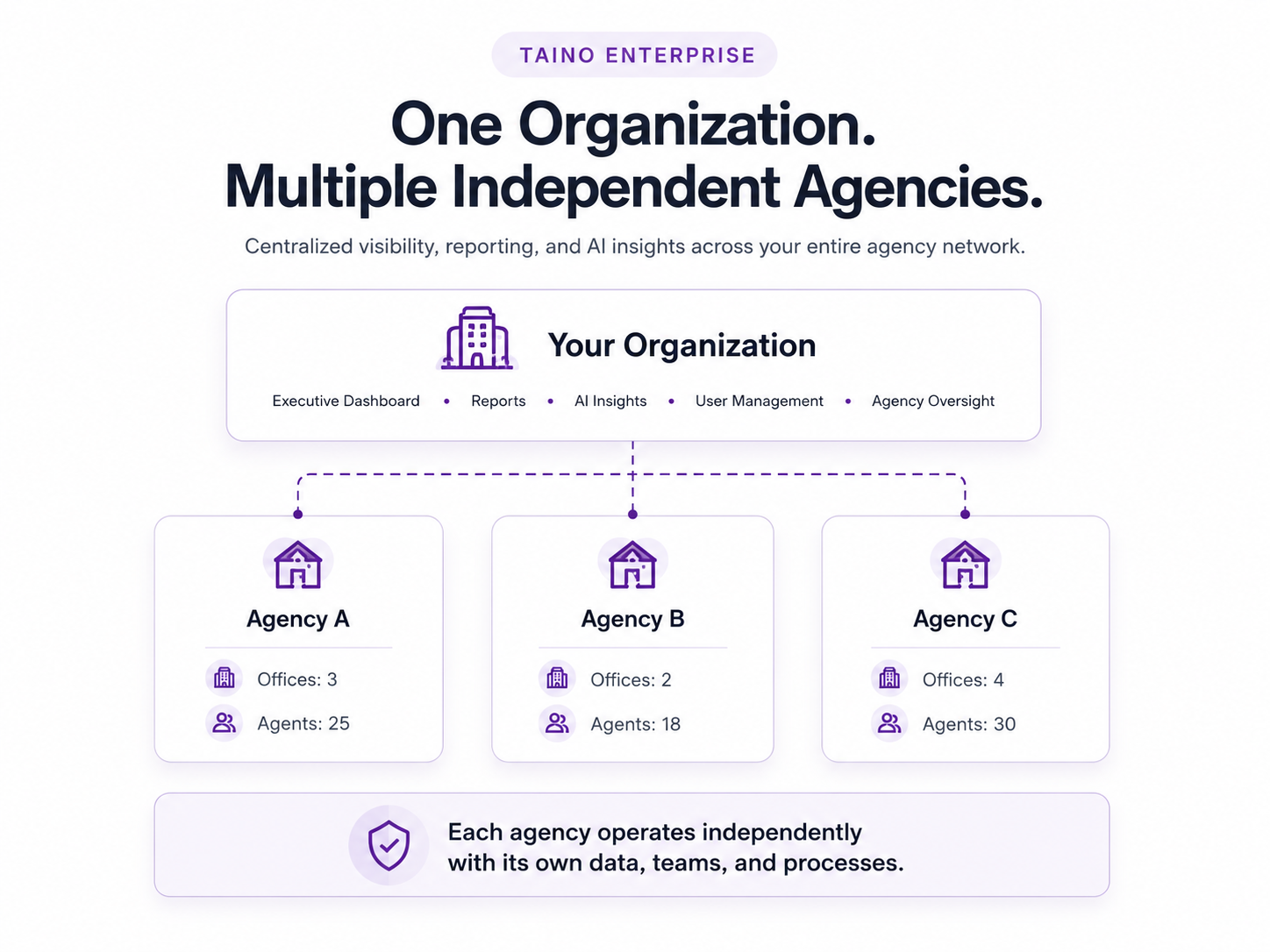
Every agency keeps its own operation, users, offices, customers, policies, workflows, and data. Authorized organizational leaders can oversee the complete network without mixing agency operations together.
- Each agency operates independently
- Each agency can manage multiple offices
- Organization-level users receive centralized access
- Permissions control which agencies and data each user can see
- Leadership can review organization-wide information
Your Organization
Executive dashboards · Reports · AI insights · Agency oversight
Agency A
Offices · Agents · Customers · Policies
Agency B
Offices · Agents · Customers · Policies
Agency C
Offices · Agents · Customers · Policies
Manage the Entire Network Without Losing Agency Independence
Organization Dashboard
View key activity and performance across the agencies you are authorized to manage.
Consolidated Reporting
Review organization-wide totals, compare agencies, and drill into individual results.
Agency & User Management
Manage agencies, agency administrators, agents, organizational users, and access levels.
Permission-Based Access
Control exactly which agencies and information each organizational user can access.
Agency-Level Access
Move between authorized agency environments without maintaining disconnected systems.
Enterprise API Access
Connect authorized data and workflows across agencies with your existing enterprise software, internal systems, and integration tools.
Built to Scale
Add agencies as your organization grows while maintaining a consistent technology foundation.
One API Across Your Agency Network
Taino Enterprise can provide secure API access across the agencies your organization is authorized to manage, helping you connect Taino with existing enterprise applications, data platforms, internal tools, and custom workflows.
- Access authorized data across multiple agencies
- Integrate with internal enterprise systems and software
- Support custom reporting, synchronization, and workflow automation
- Use permission-based access to protect agency-level data
- Scale integrations as new agencies join your organization
Connect Taino to the tools you already use
Data Platforms
Move authorized agency data into enterprise reporting and analytics environments.
Workflow Automation
Trigger and coordinate processes between Taino and external business systems.
Existing Software
Connect internal applications, portals, and operational tools.
Controlled Access
Limit integrations to the agencies, data, and operations they are authorized to use.
Ask Questions Across Your Entire Agency Network
Use plain English to analyze information across the agencies you are authorized to access. Generate reports, comparisons, charts, and actionable insights without collecting spreadsheets from every agency.
See Enterprise AI in ActionAsk Newton
Every Agency Gets the Power of Taino
The enterprise layer connects complete agency operations. Every agency can use Taino to manage its daily business while leadership oversees the broader organization.
Sales Manager
CRM & AMS
Automation
Commissions
TainoSign
Newton AI
Ready to Connect Your Agency Network?
Tell us how your organization is structured, how many agencies you manage, and what level of visibility and control you need.

Enterprise FAQ
If you have any questions please, Contact Us